Check every sitemap
Parses robots.txt for Sitemap: directives and probes 12 common paths — /sitemap.xml, /wp-sitemap.xml, Yoast variants. Follows <sitemapindex> files to count the real total of URLs across every sub-sitemap.
A free Chrome extension that audits the crawl layer of any site — sitemap, robots.txt, llms.txt, and 13 AI bots — entirely in your browser, never on a server.
Add to Chrome — FreeParses robots.txt for Sitemap: directives and probes 12 common paths — /sitemap.xml, /wp-sitemap.xml, Yoast variants. Follows <sitemapindex> files to count the real total of URLs across every sub-sitemap.
HEAD-checks every URL to surface 404s, redirects, and server errors before crawlers hit them. Results carry through to the CSV, JSON, and TXT exports.
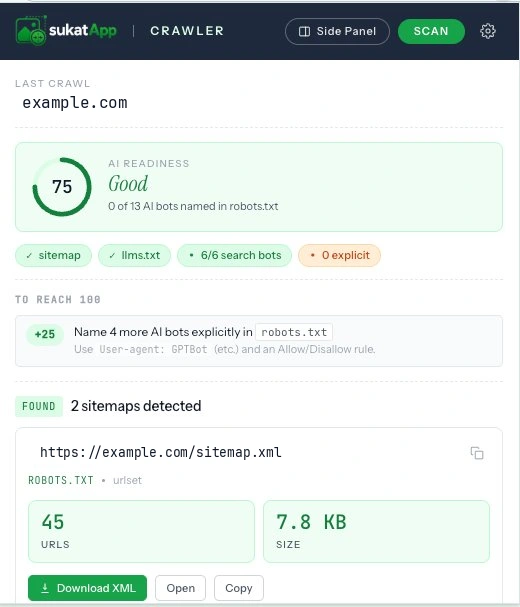
One 0–100 number weighing sitemap hygiene, llms.txt presence, and AI-search-bot access — your AI visibility at a glance, with the specific fixes to raise it, not vague advice.
Shows the raw robots.txt and parses it against every major AI crawler — GPTBot, ClaudeBot, PerplexityBot, Google-Extended, Bytespider, and more — with allow / block / default badges grouped by vendor. See which AI bots can read your content and which are walled out by a stray Disallow: — the training scrapers you may want to block, the search bots you may want to keep.
From "what do crawlers see on this page?" to a full audit, a score, and a download.
The extension fetches robots.txt, sitemaps, and
llms.txt directly from the site you're auditing.
Same kind of request your browser makes when it loads the page normally.
No backend. No analytics. No transit through Sukat servers. Your URL list, your audit results, your sitemap exports — all stay inside the tab.
Every public release of Sukat Crawler, dated and versioned. Updates ship through the Chrome Web Store — if auto-updates are on, you're already on the latest.
First public release on the Chrome Web Store. One-click audits of sitemap, robots.txt, llms.txt, and 13 AI bots — without anything leaving the browser.
robots.txt for Sitemap: directives and probes 12 common paths (/sitemap.xml, /wp-sitemap.xml, Yoast variants). Follows <sitemapindex> files to count real total URLs across all sub-sitemaps./llms.txt and /llms-full.txt for the emerging AI-readable site-map convention.robots.txt against 13 AI bots (GPTBot, ClaudeBot, PerplexityBot, Google-Extended, OAI-SearchBot, Claude-SearchBot, ChatGPT-User, Claude-User, Perplexity-User, Meta-ExternalAgent, Bytespider, Applebot-Extended, CCBot) and shows an allow/block matrix grouped by vendor.<lastmod> date.No. Free forever, no account required, no premium tier, no ads. Same model as the rest of Sukat.
No — the extension does nothing unless you click it. It doesn't run on every page you visit, doesn't track you, doesn't sit in the background fetching things. Open the popup, click Scan, and only then does it audit the current site.
Any http(s):// site. WordPress, Shopify, custom React apps, static blogs, headless CMS deployments — anywhere a sitemap could live, Crawler can find it.
Sukat (this site) compresses images to an exact KB/MB target. Inspector audits images on a page and hands the heavy ones to Sukat. Crawler audits the crawl layer of a site — sitemap, robots.txt, llms.txt, AI bot access. Three tools, one privacy model: everything runs in your browser.
Yes. The extension has no backend — there is literally no server we control that could receive your data. We don't use Google Analytics, advertising scripts, or any tracking in the extension itself. The only requests leaving your browser are the ones fetching robots.txt, sitemaps, and llms.txt from the site origin — exactly what your browser does when it loads the page normally. Full disclosure here.
Yes — GPTBot, OAI-SearchBot, ChatGPT-User, ClaudeBot, Claude-SearchBot, Claude-User, PerplexityBot, Perplexity-User, Google-Extended, Meta-ExternalAgent, Applebot-Extended, Bytespider, and CCBot. Grouped by vendor in the matrix with allow / block / default badges so you can see at a glance which AI search products can read your content.
Chrome and Chromium-based browsers (Edge, Brave, Arc, Vivaldi) work today. Firefox support is on the roadmap. Safari requires significant rework due to Apple's extension model and isn't planned yet.
Last updated June 10, 2026. This covers the Sukat Crawler extension; the Sukat website has its own website privacy policy.
Sukat Crawler runs entirely in your browser. The only network requests it makes go to the site you choose to audit — to read its public robots.txt, sitemap, and llms.txt. There is no backend, no account, and no analytics or tracking in the extension. Your URL list and audit results never leave the tab.
The only network requests Sukat Crawler makes go to the site you choose to audit. To build a report it reads that site's publicly available files — robots.txt, the XML sitemap and any nested sitemaps, and llms.txt — and checks the response status of the URLs listed in the sitemap. Those requests go straight from your browser to the target site. None of them pass through Sukat.
Sukat Crawler keeps only your settings in Chrome's local storage on your own machine. When you export a report as CSV, JSON, or TXT, the file is generated locally and saved through your browser's normal download. This data:
Because nothing lives on a server, there is nothing for Sukat to retain.
On install, Chrome warns that Sukat Crawler can "read and change your data on all websites." That broad wording is required because you can point the audit at any site — but in practice the extension only reads the public crawl files and URL statuses of the specific site you scan. It never reads or changes page content. Each permission maps to one job:
downloadsstoragesidePanelactiveTabThis page (sukatapp.com) uses standard, privacy-respecting analytics to count visits and see which pages are useful. That applies to the website only — the Sukat Crawler extension itself sends nothing. See the site's website privacy policy.
Questions about privacy or the extension? Reach the developer, Bernard Brillo, via the Sukat contact page.
Or pair it with Sukat Inspector — Crawler audits the crawl layer, Inspector audits the images. Same privacy model end to end.