Every agency gets the question eventually, and it rarely arrives politely. Six months in, on a call that was supposed to be about something else: what have you actually been doing?
It is not usually a hostile question. It is a new marketing director who inherited the contract, or a founder who just looked at the invoice total for the year, or a client whose traffic dipped for a month and who has started wondering. The work was real. The answer should be easy. For most agencies it is not.
Why the monthly SEO report does not answer the question
Rankings and traffic are outcomes. A client asking what you have been doing is not asking about outcomes — they can see the outcomes, that is what prompted the question. They are asking about inputs. What did you touch, on which page, and when.
A traffic chart cannot answer that, and an SEO report that leads with one reads as evasion even when it is not. Worse, the chart is hostage to things outside your control. A good month of work during a bad month of demand produces a line that argues against you.
The deliverables you do have are scattered across systems that were never meant to be evidence. Tickets in a project tool, notes in a shared doc, an audit spreadsheet from onboarding that nobody updated after week three, and the changes themselves sitting in a CMS that records who saved a post but not what the page looked like before. None of it ties a specific change to a specific page on a specific date, which is precisely the shape of the answer the question needs.
So the answer gets assembled from memory, late at night, before the call. And the parts you cannot remember quietly become parts you did not do.
What a per-page scan history records
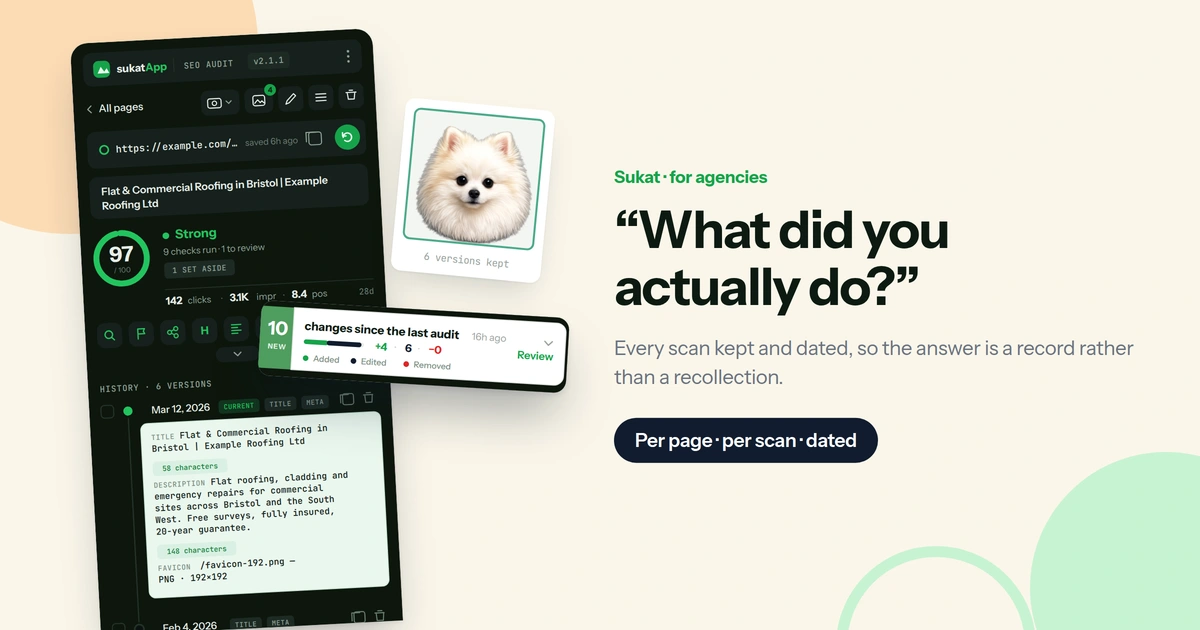
The idea is simple: every time a page is scanned, the result is kept. Not the summary, the whole scan — all nine on-page checks, their scores, and the findings underneath them, stamped with the moment it ran.
Do that for six months and the record builds itself. Each URL accumulates its own timeline: the state it was in when you took the account over, the state it was in after the first round of fixes, the state it is in now. Nothing has to be written down, because nothing was ever a note in the first place — it is the scan itself, kept.
Any two of those scans can then be put side by side, and the difference between them listed on its own: what improved, what regressed, what appeared that was not there before. That comparison is the artefact the client is actually asking for. It is not a claim about the work. It is the work, before and after, with a date on it.
Sukat SEO keeps that history per URL, in the browser, for every page it has ever scanned. The scans accumulate as you work — there is no separate step where you remember to record something, which is the step that always gets skipped.
Answering “what changed in March?” from the record
Here is what the question looks like when the record exists.
The client asks what changed on the services page in March. You open the page, open the history for that URL, and pick the last scan before March and the first one after. The comparison lists it: the title went from 71 characters to 58, a meta description appeared where there had been none, two broken internal links stopped being broken, the H2 that had been sitting above the H1 moved. Four things, with dates on both ends — a before-and-after of the page itself rather than a report about it.
That takes about a minute, and it converts the conversation. The client stops asking what you did and starts asking what is next, which is the conversation you wanted to be having.
When the client’s own developer breaks the page
It also protects you in the other direction. A page that regressed in April because the client’s developer shipped a template change is visible in the same record — the scan before the change, the scan after, and the check that flipped from pass to fix. That is a much easier conversation to have with evidence than without it, and it is one most agencies currently lose by default.
Scan the client’s pages before you change anything
This is the habit worth building, and it is the one most agencies do not have. Onboarding a new client, scan the pages that matter before making a single change. The homepage, the money pages, the top ten by traffic — twenty minutes of work at the very start.
The reason is that the before state is destructive to create later. The moment you fix the missing meta description, the evidence that it was ever missing is gone. Six months on, when you want to show what the site looked like when you inherited it, there is nothing to show — the site looks like your work, and your work is invisible precisely because it worked.
A baseline scan is the cheapest insurance in the engagement. It costs twenty minutes once and it is the thing you will reach for at renewal, at the quarterly review, and on the day someone senior asks what the retainer bought.
If the pages to scan are not obvious yet, the three-page method is a fast way to find them — start with a homepage, a page that earns traffic, and a page nobody has thought about, and let the pattern across those three tell you whether the problems are in the template or the pages.
What a dated record is worth at renewal
Retainers are lost in the gap between the work done and the work seen. The client is not comparing your work to no work; they are comparing their memory of the last twelve months to the invoice. Memory is short and invoices are long.
A record changes the arithmetic. Forty pages scanned, a hundred and sixty findings closed, every one of them with a page and a date attached — that is a different renewal conversation than another month of SEO performance reporting, because it is countable and it is specifically yours. Nothing else in the engagement is.
Using the same record to win the next account
It also sharpens the pitch for the next account. Scanning a prospect’s site before the first call gives you a scored list of what is wrong with it, and the same tool that produces it will be producing the proof that you fixed it. The audit that wins the work and the record that keeps it are the same artefact at two points in time.
Where scan history is stored, and who owns it
The scans are stored locally, in the browser that ran them. Nothing is uploaded, which is the same privacy model as the rest of the extension and the reason it can be pointed at a client’s staging site without a conversation about data processing.
The trade-off is worth stating plainly. A history that lives in a browser is a history that lives on a machine. For a solo consultant or a small team where one person runs the audits, that is fine and it is one less vendor holding client data. For a larger agency it means deciding who owns the scanning, the same way somebody already owns the Search Console access.
Scanning a page, keeping its history and reading its Search Console figures are all free. One page at a time, the record described above costs nothing. What Pro adds is the scale a book of business needs: re-auditing in bulk with version history across a whole site rather than a page at a time, the Search tab for the whole property, and bulk Search Console sync. $29 once, five browser profiles, no subscription and no per-seat monthly — less than an hour of billable time, set against every renewal conversation for as long as the tool is installed.
Start the record on the clients you already have
The best time to have started was the day you took the account on. The second best is now, because a history that starts today is still a history in three months, and three months of dated evidence beats none at the review that is already in the calendar.
Scan the pages that matter for each client you currently hold. It is one afternoon across a whole book of business, and from that afternoon forward every scan you run adds to a record instead of disappearing into one.
On-page is one layer of it. What the crawlers are allowed to see — the sitemap, robots.txt, and increasingly which AI bots are permitted — is the other, and it changes under you without warning when a client’s developer edits a file nobody told you about. Sukat Crawler covers that layer.
Frequently asked questions
What should you show a client who asks what you have been doing?
The inputs, not the outcomes. A dated before-and-after for the pages you worked on — what the title was and what it is now, which findings closed, on what date — answers the question a traffic chart cannot.
Is a monthly SEO report enough to prove the work?
Not on its own. A monthly report shows outcomes — rankings, sessions, conversions — and a client asking what you have been doing has already seen those. What the report cannot show is which page you changed and when. A dated scan history answers that directly, and the two work better together than either does alone.
Why scan a site before making any changes?
Because the before state cannot be recovered afterwards. Once the missing meta description is fixed, nothing on the site shows it was ever missing. Twenty minutes of baseline scanning at onboarding is what makes the work visible at renewal.
Where is the scan history stored?
In the browser that ran the scans. Nothing is uploaded, which is why the extension can be pointed at a client's staging site without a data-processing conversation — and it means the history lives on a machine, so somebody has to own the scanning the way somebody already owns the Search Console access.
Is scan history a paid feature?
A page's own history is free, as is Search Console data for that page. Pro adds the tooling for a book of business: bulk re-auditing with version history, the Search tab across a whole property, and bulk Search Console sync. $29 once, five browser profiles.

About Sukat
Sukat builds free, privacy-first browser tools for compressing images and verifying published content. Everything runs in your browser — nothing is uploaded.