Most "best image compressor" comparisons pit a privacy-first tool against a server-based one, and the conclusion writes itself. This one is harder, and more useful: CompressJPEG and Sukat are both genuinely client-side. Neither uploads. Neither watermarks. Neither asks for an account.
So the honest comparison isn't about which one respects your files. It's about what each one is built to do once the file is loaded.
What CompressJPEG gets right
Worth stating plainly, because it is not a weak tool.
CompressJPEG runs MozJPEG — Mozilla's JPEG encoder — through WebAssembly in the browser. MozJPEG is a real advantage over a naive Canvas re-encode: it makes smarter decisions about which data to discard, and the site's own documentation puts the gain at roughly 5–15% better compression at the same visible quality. Everything happens locally, with no server round trip.
The interface is deliberately narrow. Drop in up to 20 JPEGs, hit compress, and every file is processed with sensible defaults. Tap any thumbnail to override the quality for that image individually. Save one at a time, or save everything at once. There is no mode selector, no format dropdown, no settings panel to work through.
For the common case — a folder of photos that needs to weigh less before it goes onto a website — that narrowness is the feature. The tool does one thing and gets out of the way.
Where the two tools actually diverge
The split shows up the moment the destination states a number.
| Sukat | CompressJPEG | |
|---|---|---|
| Runs in the browser, no upload | Yes | Yes |
| No signup, no watermark | Yes | Yes |
| Compression control | Quality slider and exact KB/MB target | Quality slider (0–100%) |
| Hits an exact file size | Yes — binary search on quality | No |
| Input formats | JPEG, PNG, WebP, HEIC, AVIF | JPEG |
| Output formats | JPEG, WebP, PNG, ICO | JPEG |
| Batch limit | Batch with one shared KB target | 20 files |
| ZIP download | Yes | Not offered |
| Crop before compressing | Built in (1:1, 16:9, 4:3, 3:4, free) | Separate step elsewhere |
| Background removal | Yes | No |
| Interface languages | 10 | English |
| PNG and GIF handling | Same tool | Separate sister sites |
Compiled from each tool's publicly documented behaviour at the time of writing. Features change; check both before relying on a row.
Quality 80 is not 100 KB
This is the difference that matters, and it's easy to underrate until it costs an afternoon.
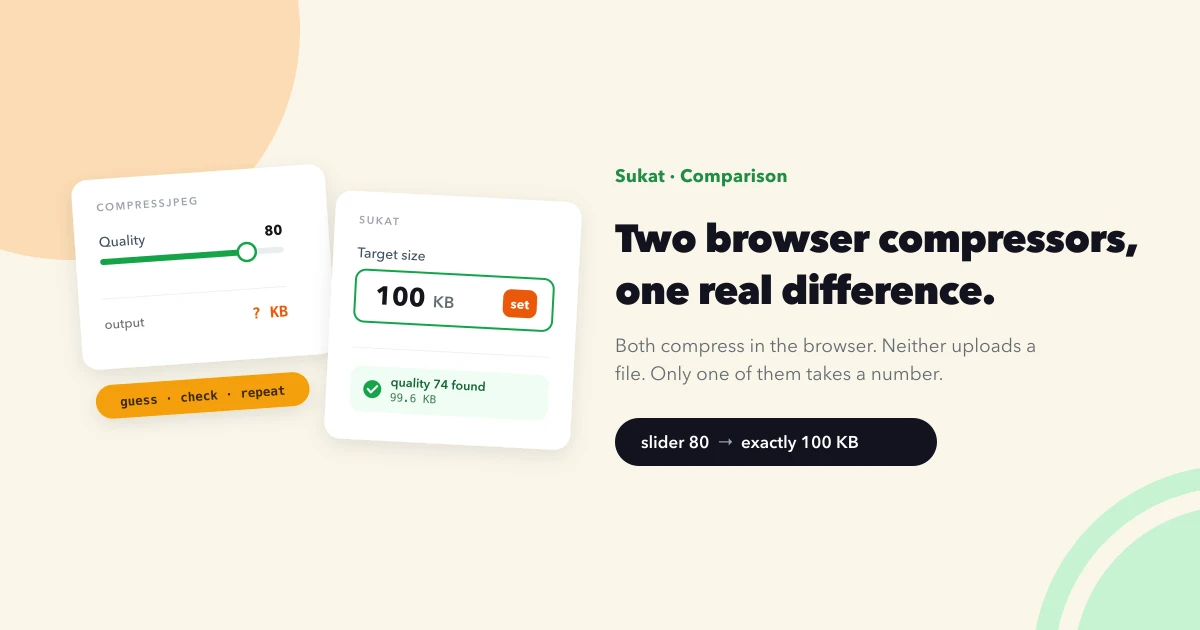
A quality slider is an input, not an outcome. Setting quality to 80 tells the encoder how aggressively to throw away data — it says nothing about the number of kilobytes that come out the other side. A dense forest photo at quality 80 might land at 340 KB. A flat product shot on white at the same setting might land at 45 KB. Same slider position, an eightfold difference in result.
That's fine when the goal is vague ("lighter"). It falls apart when the goal is specific. Government exam portals, visa applications, job boards, and older CMS installs routinely state a hard ceiling: under 100 KB, under 50 KB, maximum 200 KB. Miss it and the upload is rejected outright.
With a slider, the only route to a stated number is guess-and-check. Compress at 80, look at the size, too big, try 60, now it's ugly, try 70, still 6 KB over, try 68. Repeat per image.
Sukat inverts the input. You give it the number, and it works out the quality — binary-searching the quality level, testing settings and narrowing the range until the output lands on the target you set, then stopping. Ask for 100 KB and the file comes back at 100 KB, at the best quality that size permits. The guessing loop is the part that gets automated.
For the size a specific destination expects, the image size guide lists the common ones, and reducing an image straight to a KB target is a one-field job.
JPEG only, versus whatever came off the phone
CompressJPEG handles JPEGs. PNG and GIF live on separate sister sites, which is a clean architecture but means the format you have decides the URL you open.
The friction lands hardest on iPhone photos. Modern iPhones save as HEIC by default, and HEIC is not a JPEG — dropping one into a JPEG-only tool does nothing useful. The usual workaround is a conversion tool first, then the compressor, which means the file passes through two websites and, on most conversion sites, one server.
Sukat takes HEIC directly. Converting HEIC to JPG, compressing a HEIC in place, or going HEIC to PNG all happen in the same session, on the device, with the size target applied in the same pass. AVIF input works the same way, which matters more each year as more sites serve and more phones save in it.
Output is a choice too: JPEG, WebP, PNG, or ICO. If a detailed photo is currently a heavy PNG, switching it to JPEG during compression is often the single biggest saving available — the reasoning is laid out in AVIF vs WebP vs JPEG.
Batch work, and what happens after
Both tools do batches. What differs is the exit.
CompressJPEG takes 20 files per session and offers a save-all action once they're processed. Sukat applies one shared KB target across the whole batch and can package the results as a single ZIP, which is the difference between one download and twenty — and a meaningfully different experience on a phone, where twenty separate save prompts is its own small ordeal.
Sukat also folds in steps that would otherwise be separate stops. Cropping and compressing in one workflow covers the common passport and profile-photo case, where the image needs specific framing and a specific weight. The passport photo compressor handles the country-specific version of that job. Background removal sits in the same tool rather than a fourth tab.
Ten interface languages is the quieter one. Exact-KB requirements are most common on government and exam portals outside the English-speaking web, and an English-only interface is a real barrier for the exact audience the feature serves.
So which one
A short version, without hedging.
Use CompressJPEG when the files are already JPEGs, the target is "smaller," and speed matters more than precision. MozJPEG is a strong encoder and the interface has almost nothing to learn. For a batch of blog photos that need trimming, it's a good answer.
Use Sukat when any of the following is true:
- A form, portal, or platform has stated a hard KB or MB limit
- The files are HEIC from an iPhone, or AVIF
- A PNG or WebP needs compressing without switching sites
- The batch should come back as one ZIP
- The image needs cropping or a background removed on the way through
- The interface needs to be in something other than English
They aren't really competing for the same minute of your day. One is a fast lever for making JPEGs lighter. The other is for when a number has been handed to you and the file has to hit it.
If the wider problem is that a site is heavy rather than one file being oversized, finding and fixing oversized images is the place to start, and LCP is almost always an image problem explains why the hero image usually deserves attention first.
Frequently asked questions
Is CompressJPEG safe to use?
Yes. It processes files locally in the browser using WebAssembly, so images aren't uploaded to a server. On the privacy question it's in the same category as Sukat — that's not where the two tools differ.
Can CompressJPEG compress to a specific file size like 100 KB?
No. It offers a quality slider, which controls the compression level rather than the resulting file size. Reaching a stated number means adjusting and re-checking manually. Sukat takes the target size as the input and searches for the quality that hits it.
Does CompressJPEG support HEIC files from an iPhone?
No — it handles JPEGs, with PNG and GIF on separate sister sites. Sukat accepts HEIC directly and can convert and compress it in a single pass without the file leaving the device.
Which compressor produces smaller files?
At the same visual quality the two are close, because both are doing lossy JPEG encoding in the browser. The practical difference isn't raw ratio — it's that Sukat can be told exactly where to stop, so the output matches a required size instead of landing wherever the slider left it.
Is there a free alternative to CompressJPEG that hits an exact size?
Sukat. It's free, runs entirely in the browser with no upload and no account, and compresses to an exact KB or MB target across JPEG, PNG, WebP, HEIC, and AVIF.

About Sukat
Sukat builds free, privacy-first browser tools for compressing images and verifying published content. Everything runs in your browser — nothing is uploaded.